








How did I get 50 LeoSpins spins?
In the LeoSpins lobby The Ultimate 5 carries a green FOR FREE badge. Tap it and the casino lists two tasks: confirm your phone number and turn on notifications. No deposit is needed.
What they wanted was my phone number and permission to send notifications. I typed the number, picked "Send code by SMS", waited about twenty seconds, typed six digits, tapped Allow on the notification prompt. Done. 50 spins on The Ultimate 5, a Pragmatic slot with a big lion on the reels, which fits the brand nicely.
I won a bit, lost a bit, ended with a few euros of winnings in the account. Not life-changing. But I had a feel for the lobby, the spin counter and how fast the games load, and I had not spent a cent. That is what a no deposit offer should do.
Phone number, one code, 50 spins. That's the whole deal.
Claim 50 free spinsWhat do the 50 free spins need?
Three things: a LeoSpins account, a mobile number that has not been used on another account, and a browser or phone that allows notifications. The bonus feed shows it as two halves, 25 spins for the phone step and 25 for notifications. Some accounts see a bigger version, up to 60 spins, but 50 is the standard.
| Step | What happens | Spins |
|---|---|---|
| Phone number | Code by SMS or phone call | 25 |
| Notifications | Allow in browser or Home Screen app | 25 |
| Both done | Claim bonus button turns active | 50 total |
One number, one account. If your number was already confirmed somewhere else, LeoSpins shows "This phone number has already been verified on another account" and the spins will not come.
If the SMS takes too long, tap "Call me instead". A machine reads the code out. Took me 15 seconds on the second try.
How do LeoSpins notifications work on iPhone?
Most people get stuck at this step on iPhone. Safari only allows notifications from a site that has been added to the Home Screen, so add LeoSpins first and turn on notifications second.
- Open leospins.com in Safari, not in Chrome or inside another app.
- Tap the Share icon, then Add to Home Screen, then Add.
- Open LeoSpins from the new icon and log in.
- Tap Turn on notifications and allow them, then confirm your phone.
On Android it is simpler: Chrome asks once, you tap Allow, done. If you blocked notifications by accident, LeoSpins says so and you can switch them back on in the browser settings, then tap Try again.
The Home Screen app is the same LeoSpins with the same account, just in its own window. More on that on the LeoSpins app page.
How does the Leo Cash chest pay?
Leo Cash is a treasure chest that shows up after every deposit. You tap it, the lid flies off, and you win an instant cash prize. The rules on the info button are short: the game is available after every deposit, you need to play it to get the prize, you get 2 attempts, and you can come back the next day to try again.
Winnings land as bonus money, tied to the bonus rules.
A cash prize, credited straight away.
The prizes I saw were small. Nobody is paying rent with Leo Cash. But it is a nice touch on a €10 deposit that gets no welcome bonus, and the chest animation is genuinely fun the first few times.
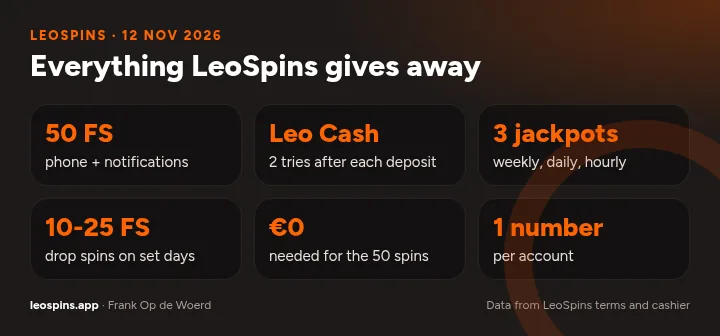
- 50 FS phone + notifications
- Leo Cash 2 tries after each deposit
- 3 jackpots weekly, daily, hourly
- 10-25 FS drop spins on set days
- €0 needed for the 50 spins
- 1 number per account
How do the LeoSpins jackpots work?
LeoSpins runs three jackpot pots, which the lobby calls Jampots: weekly, daily and hourly. Each one shows a live total and a "Drops in" countdown, and it pays out before the timer hits zero. Any real money spin on the slots in that jackpot row can land it.
The weekly row had games like Jackpot Blaze and Fortune Quest, the daily row its own set. Free spins from the packs land on fixed games, so if you want a shot at the pot you need to play the jackpot slots with your own balance.
Which drop spins can you get later?
After the welcome offer, LeoSpins keeps sending small free spin drops on set days. They are personal: what you get depends on whether you deposited, confirmed your phone and kept notifications on. A few real examples from the bonus list:
| When | Spins | Game |
|---|---|---|
| 7 days after a deposit | 20 | Sweet Bonanza 2500 |
| 16 days, app user with a deposit | 20 | Gates of Olympus 1000 |
| 30 days after a deposit | 20 | Big Bass Blast |
| 14 days, no deposit, no phone | 25 | Gates of Olympus 1000 |
Does LeoSpins have a VIP programme?
Not one you can see. There are no levels, no points shop and no cashback table on the site. The rewards are the welcome offer, Leo Cash, the jackpots and the drop spins above. I would rather a casino say nothing than invent a VIP ladder with a "diamond" tier nobody ever reaches, so this does not bother me. If LeoSpins adds a loyalty scheme, it goes in the log on the home page.
Free spins without a deposit, start to finish
How do you get LeoSpins spins without depositing?
Register with your e-mail and a password and open the activation link from the LeoSpins e-mail. Without that link the account stays half-finished and the bonus buttons will not work properly. It takes less than a minute.
Then confirm your phone. Enter your mobile number, choose a code by SMS or a phone call, and type it in. Remember that one number works on one account only. If you share a phone with someone who already plays at LeoSpins, the spins will not come to you.
Next, notifications. On Android, allow them when Chrome asks. On iPhone, add LeoSpins to the Home Screen from Safari first, open it from the icon, then allow notifications. When both steps are done, the Claim bonus button gives you 50 spins on The Ultimate 5.
Play them soon. Free spins winnings land as bonus money with their own rules, which you can see in the cashier under Bonus balance and Wager progress. If you later take a bonus pack, those spins run one set at a time too, so it helps to clear the 50 first.
After that, keep notifications on. The drop spins, 10 to 25 at a time on games like Sweet Bonanza 2500 and Gates of Olympus 1000, only arrive that way. And when you do make a deposit, open the Leo Cash chest: two tries, real cash prize, and another chance the next day.
- Activate your account from the e-mail link
- Use a phone number not linked to another account
- On iPhone add LeoSpins to the Home Screen first
- Allow notifications and tap Claim bonus
- Play the 50 spins on The Ultimate 5 soon
- Keep notifications on for drop spins